Category: Network

  • Cisco ASA Password recovery without loosing configuration

    Cisco ASA Password recovery without loosing configuration

    If you have lost the password and you want to reset the password of your Cisco ASA router without losing the configuration, below is the process to do so.

    Please note: You must be very careful when performing this procedure and have physical access to the router to complete it.

    Connect via Putty (COM)
    Boot the device
    During boot, press CTRL+C

    Before proceeding, take note of the  current configuration register
    Do you wish to change this Configuration Y
    Disable System Configuration Y
    The rest press Enter (default)

    When the prompt is ready, type boot
    When the router boots with the default configuration, enter enable (enable password is blank)

    Enter copy startup-config running-config
    After the configuration is complete, enter the following

    Configure Terminal
    Password <New_Password>
    Enable Password <New_Password>
    Username <User> password <New_Password> Privilege 15
    config-register <Register code from the start>

    Save the configuration by running copy running-config startup-config

    Reboot the router, and you should have access to the configuration.
  • Unifi Controller Start-up Failed

    Unifi Controller Start-up Failed

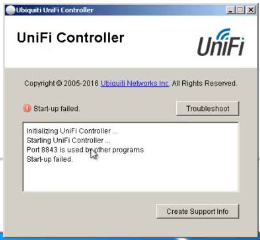
    When starting up your UniFi controller on your server, you might be prompted with the error saying “Start-up failed” as the screenshot below.

    Some might manage to see that the application says that Port 8443 is in use by another application. Some CCTV applications or other web applications installed on the server would use the same port.

    Here you would have two choices, you can uninstall the conflicting application or just change the port of the UniFi controller.

    To change the port of the UniFi controller, you need to open the system.properties file from C:\Users\<user name>\Ubiquiti UniFi\data.

    Remove the hash from the below lines and change the port to 8445 and both lines should be as below.

    unifi.https.port=8445
    portal.https.port=8445

    Save the file and close Notepad. Open the UniFi Controller and the issue will be resolved and the service will start with no issues.